Why this matters
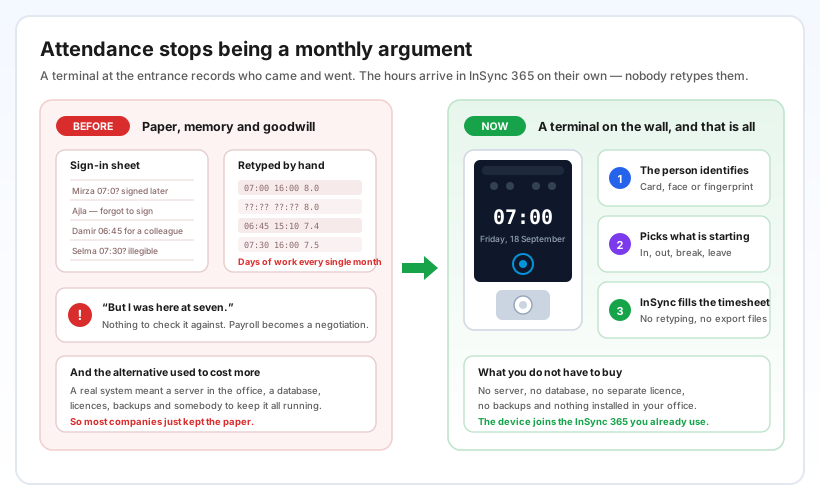
Most companies still run attendance on a sheet of paper and everyone's good word. It works until the end of the month, when somebody has to read the handwriting, chase the missing rows, retype it all into a spreadsheet, and then defend the result in a conversation that starts with “but I was here at seven”. There is nothing to check the claim against, so payroll turns into a negotiation.
The honest reason companies stayed on paper is that the alternative used to be expensive. A real attendance system meant a server in the office, a database, licences, backups and somebody to keep it all alive. That is a project — and the project is exactly what most businesses were never going to start for the sake of clocking in.
That trade-off is gone. The terminal records who came and went, and InSync 365 turns it into hours by itself.
Card, face or fingerprint — pick what fits the place
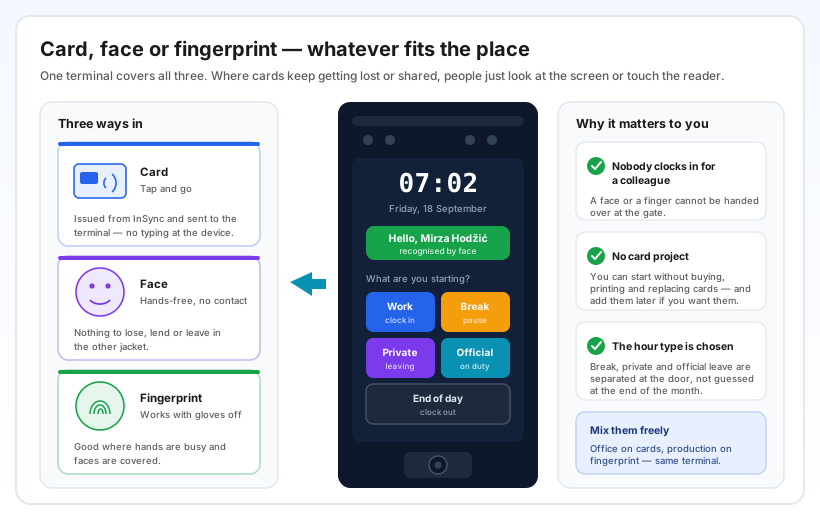
The same terminal reads all three. A person taps a card, looks at the screen, or touches the fingerprint reader — whichever suits the location. The office can stay on cards while production works by fingerprint, on the same device.
This matters more than it sounds. Cards get lost, lent and left in the other jacket, and a card handed to a colleague at the gate is the oldest trick in attendance. A face and a finger cannot be passed on. It also means you can start without a card project at all — no buying, printing, distributing and replacing cards — and add cards later if you decide you want them.
After being recognised, the person picks what is starting: work, a break, a private errand, an official errand, or the end of the day. Break time and private leave are separated at the door, in the moment, instead of being reconstructed from memory at the end of the month.
Cards are issued to people from InSync and sent down to the terminal on their own — nobody stands at the device typing card numbers. Face and fingerprint are enrolled once on the terminal itself, the first time the person walks up to it.
The internet goes down. The workday does not.
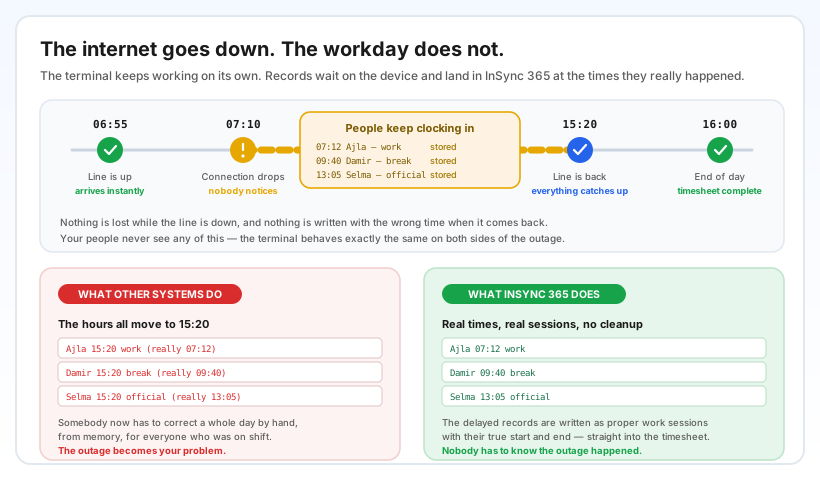
Connections fail — on a site, in a warehouse, in a building where the line drops for an afternoon. The terminal does not care. It keeps working on its own, people carry on clocking in and out exactly as before, and every record waits safely on the device.
What happens when the line comes back is the part worth reading twice. Many systems stamp the whole backlog with the moment they reconnected, so a full day of work shows up at 15:20 and somebody has to correct it by hand, from memory, for everyone on shift. InSync 365 writes the delayed records as proper work sessions, with the start and end times they actually had.
Nothing is lost while the line is down, and nothing is written at the wrong time when it returns. In practice nobody in the company needs to know there was an outage at all.
Where you see it in InSync 365
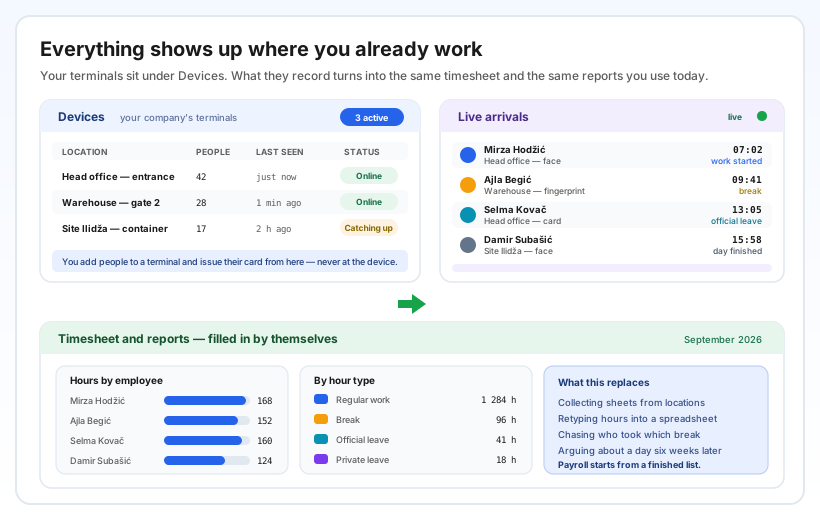
Your terminals appear under Devices, where you see each one's location, how many people are on it, when it last reported and whether it is online or still catching up. From that list you also add people to a terminal and issue their card — never at the device itself.
Arrivals show up as they happen, with the person's name, the location, how they identified themselves and what they started. From there it all flows into the timesheet and the reports you already use — hours by employee, hours by type (regular work, break, official and private leave). Nothing new to learn, no second application, no export file to shuttle between systems.
For accounting, the practical effect is that payroll starts from a finished list instead of a pile of sheets. For management, it is that you can see who is on site right now, across every location, without calling anyone.
No servers, no licences, no IT project
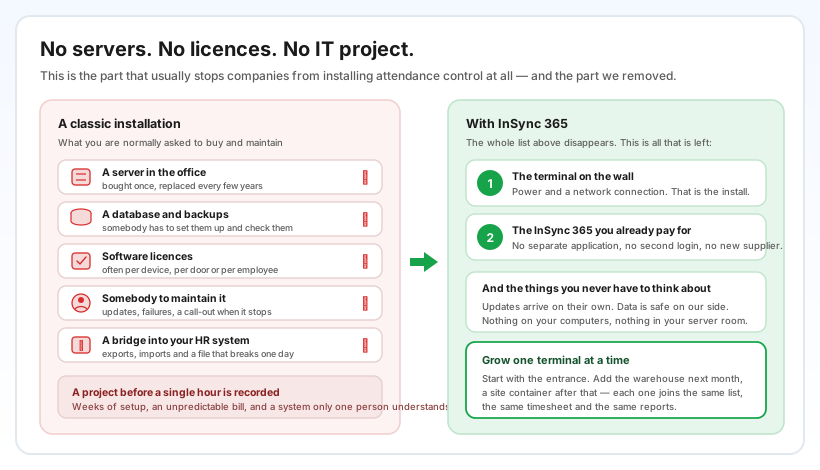
This is the reason the feature exists. A classic access-control installation asks you for a server, a database, backups, licences — often per device or per employee — somebody to maintain all of it, and a bridge to push the data into your HR system, which is the piece that quietly breaks one day.
None of that applies here. The terminal needs power and a network connection; the rest is the InSync 365 you already pay for. There is no separate application, no second login, no new supplier and nothing installed on your computers or in your server room. Updates arrive on their own and the data sits safely on our side.
Because there is no project to justify, you can also grow one terminal at a time: start at the main entrance, add the warehouse next month, put one in a site container after that. Each new terminal joins the same list, the same timesheet and the same reports.
About the terminal itself
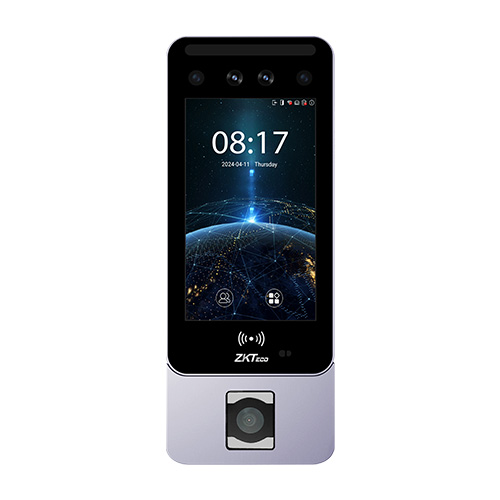
We work with proven ZKTeco terminals — the Horus E2 series, including the fingerprint variant shown here. It mounts on the wall by the entrance, shows the time and the person's name on a touchscreen, and covers face, fingerprint and card in one unit.
Which model suits you depends on the location and how your people will identify themselves, so tell us what the place looks like and we will recommend one. If you already own compatible ZKTeco devices, talk to us before buying anything new.